What is a Property Management System in Hotels? Complete Guide
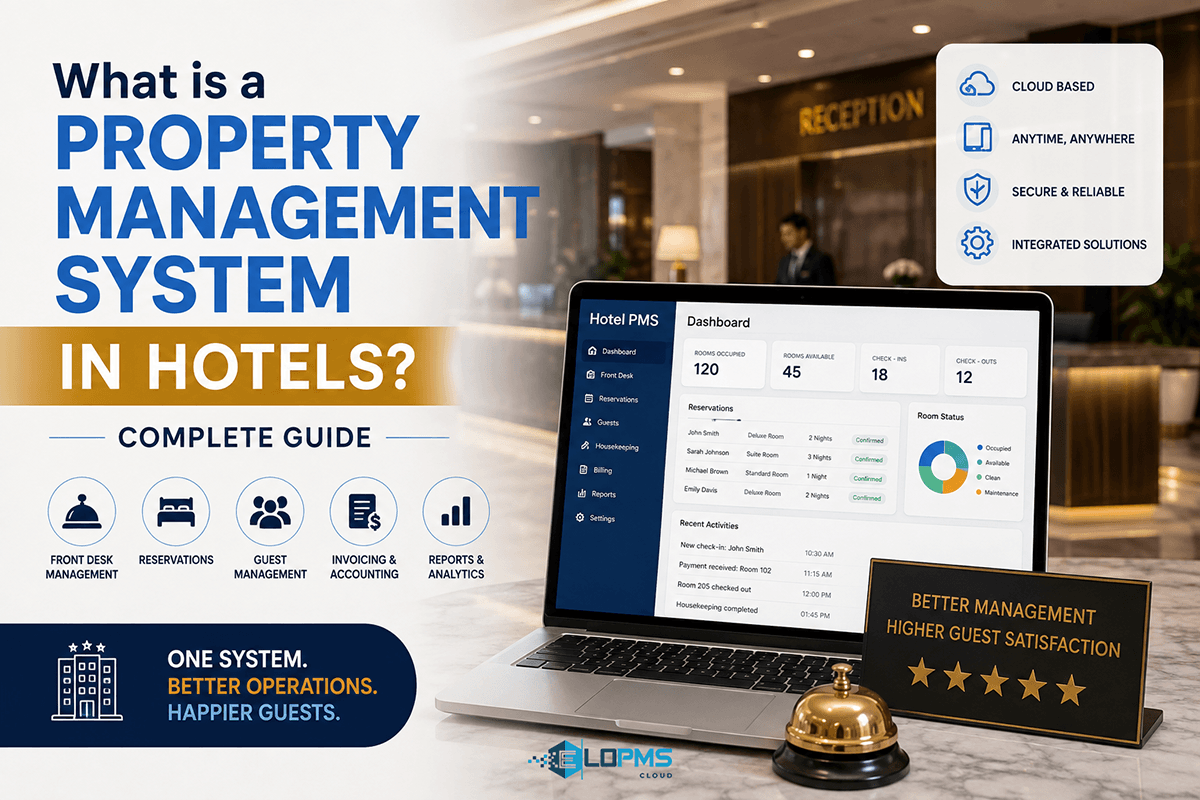
A property management system (PMS) is the central software platform hotels use to manage daily operations — front desk reservations and check-ins, room assignments, housekeeping coordination, guest billing, and reporting. Modern cloud-based PMS solutions integrate booking engines, channel managers, restaurant point-of-sale systems, and accounting into a single unified platform.
The hotel PMS has evolved significantly from the legacy green-screen systems of the 1980s. Early PMS platforms were standalone desktop applications focused solely on front desk tasks — checking guests in, assigning rooms, and generating folios. As the internet transformed hotel distribution, PMS platforms expanded to include channel manager integration with OTAs like Booking.com and Expedia, commission-free booking engines for direct website reservations, and connections to restaurant point-of-sale systems for charge-to-room billing. Today, comprehensive cloud-based PMS platforms like EloPMS serve as the operational backbone for independent hotels and hotel groups — connecting front desk, outlets (restaurants, banquet halls, spas), accounting, and compliance into one unified system.
Why does this matter? Every guest transaction flows through the PMS. A booking arrives from Booking.com — the PMS updates inventory across all channels instantly. A guest charges dinner to their room — the restaurant POS posts it to the folio. Night audit closes the day — the PMS calculates occupancy, Average Daily Rate (ADR), and Revenue Per Available Room (RevPAR) automatically. For hotels in Pakistan, Saudi Arabia, and Malaysia, the PMS also ensures compliance with mandatory e-invoicing regulations (FBR, ZATCA Phase 2, MyInvois).
Let's break down exactly what a PMS does, how it works, and how to choose the right one for your property.
What Does a Property Management System Do?
A hotel PMS handles four core areas: front office operations, distribution and bookings, guest services and billing, and back-office management. Here's what each area covers.
Front Office Operations
The front office is the heart of hotel operations — reservations, check-in/check-out, room assignment, and housekeeping coordination. A PMS automates and streamlines every front desk task.
Reservations management: The PMS captures bookings from all channels — direct phone calls, walk-ins, your website booking engine, and OTAs (Booking.com, Expedia, Agoda, Airbnb). Every reservation is logged with guest details, room type, rate plan, check-in/check-out dates, and special requests. The system manages rate plans (rack rates, corporate rates, early-bird discounts, seasonal packages), group bookings with rooming lists, and inventory allocation.
Tape chart and room assignment: The tape chart (also called a room grid) is a visual representation of room availability, occupancy status, arrivals, departures, and maintenance blocks. Front desk staff use it to assign specific rooms to reservations — drag-and-drop interfaces let you move a guest from room 302 to room 405 in seconds. Room status updates in real-time: vacant clean, occupied, dirty, inspected, out of order.
Check-in and check-out: At check-in, the front desk pulls up the reservation, verifies guest ID and passport details, captures payment authorization (credit card pre-auth), and assigns a specific room. The PMS integrates with key card encoding systems — the front desk generates a key card on the spot. At check-out, the system calculates total charges (room nights, taxes, minibar, restaurant charges posted from the POS), processes payment, and closes the folio.
Guest profiles and CRM: A PMS maintains detailed guest profiles — contact information, past stay history, room preferences (king bed, high floor, late checkout), VIP status, and loyalty tier. When a repeat guest books, the system flags their preferences for the front desk. Research shows repeat guests spend 67% more than first-time visitors, making guest recognition a revenue driver.
Housekeeping coordination: Housekeeping staff update room status in real-time via mobile apps or tablets — "Room 302 cleaned and inspected." The front desk sees the update instantly and can assign the room to an arriving guest. The PMS tracks housekeeping productivity (rooms cleaned per shift), inspection checklists, and maintenance requests.
Night audit: Night audit is the end-of-day financial close. The PMS automatically posts room charges, reverses no-show reservations, calculates occupancy percentage, ADR, and RevPAR, reconciles payments, and rolls over to the next business day. What used to take 2–3 hours manually now happens in minutes.
Example scenario: A guest books a deluxe room via Booking.com. The PMS automatically updates inventory (one fewer deluxe room available across all channels), creates a reservation record, flags it as an OTA booking subject to 18% commission, and alerts housekeeping to prepare the room. At check-in, the front desk pulls up the reservation, verifies ID, assigns room 302, generates a folio, and posts the first night's room charge. When the guest checks out two days later, the PMS calculates total charges — 2 nights + minibar charges + restaurant dinner posted from the restaurant POS system — processes payment, and closes the folio.
Distribution & Bookings
Distribution is how hotels capture bookings. A comprehensive PMS integrates channel manager connectivity to OTAs and a commission-free booking engine for direct website reservations.
Channel manager integration: A channel manager syncs your rates and availability across OTAs (Booking.com, Expedia, Agoda, Airbnb, VRBO, Google Hotel Ads) and Global Distribution Systems (GDS) like Amadeus, Sabre, and Galileo. Two-way sync means you update rates and availability once in the PMS, and it pushes to 100+ channels automatically. When a booking arrives from Booking.com, the PMS updates inventory in real-time across all other channels to prevent overbookings.
Booking engine (commission-free direct bookings): OTAs charge 15–30% commission per booking. A built-in booking engine on your website captures direct reservations at 0% commission, protecting your margins. The booking engine displays live availability, secure payment processing, instant confirmation emails, and promo code support. For a 30-room hotel averaging PKR 8,000 ADR at 70% occupancy, shifting just 20% of bookings from OTA (20% commission) to direct (0% commission) saves PKR 201,600 monthly (~$720 USD).
Rate management: The PMS supports dynamic pricing, seasonal rate adjustments, last-minute deals, promotional codes, corporate contracts, and group rates. Some platforms include revenue management modules with automated pricing recommendations based on demand forecasting and competitor rates.
Inventory control: You set allocation rules — hold 5 rooms for walk-ins, release the group block 30 days before arrival, apply minimum 2-night stay requirements on weekends, block rooms during maintenance. The PMS enforces these rules automatically.
Key distinction: Many hoteliers confuse "PMS" with "channel manager" or "booking engine." A channel manager is a distribution tool that connects you to OTAs. A booking engine captures direct bookings from your website. A comprehensive PMS includes or integrates with both. Standalone channel managers exist, but they require manual data entry into a separate PMS — an all-in-one PMS eliminates that duplication.
Guest Services & Billing
Every guest charge — room, tax, F&B, spa, minibar, laundry — is tracked on an electronic folio. The PMS ensures accurate billing, supports multi-currency payments, and generates compliant invoices.
Folio management: The folio is the guest's running bill. The PMS tracks all charges: room revenue, taxes (VAT, tourism tax, service charge), restaurant meals, banquet event fees, spa treatments, minibar items, and laundry. You can split folios (company pays room, guest pays incidentals), combine folios for group billing, and post manual charges (airport transfer, extra bed).
Charge-to-room (outlet integration): When a guest dines at your hotel restaurant or books a banquet, the POS system posts charges directly to their room folio. No separate billing, no reconciliation headaches. The guest settles everything at checkout. This seamless integration is critical for hotels with banquet and events operations where per-plate catering and function room charges need to flow to guest folios automatically.
Multi-currency and payment processing: The PMS accepts payments in multiple currencies, integrates with payment gateways (Stripe, PayPal, local processors), supports credit card pre-authorization, processes deposits and refunds, and handles foreign exchange conversions.
Invoicing and receipts: The PMS generates itemized invoices with tax breakdowns, emails receipts automatically, and maintains audit trails. For hotels in regulated markets, this is where compliance becomes non-negotiable.
Compliance callout: For hotels in Pakistan, Saudi Arabia, UAE, and Malaysia, tax compliance isn't optional — it's mandated by law. Pakistan's Federal Board of Revenue (FBR) requires real-time e-invoicing integration via the FBR Iris portal. Saudi Arabia's ZATCA Phase 2 enforces XML-formatted invoices with QR codes and cryptographic signatures submitted in real-time. Malaysia's MyInvois system is rolling out nationwide in 2024–2025. A PMS with built-in compliance (not a third-party add-on) ensures every invoice is automatically formatted, validated, and submitted to the tax authority without manual intervention. Penalties for non-compliance are severe — Pakistan imposes PKR 500,000 fines; Saudi Arabia levies SAR 50,000 penalties. This is a critical selection criterion for hotels in these markets.
Back-Office Management
The back office handles accounting, inventory, purchasing, reporting, and multi-property consolidation. A comprehensive PMS integrates these functions or connects tightly with specialized accounting software.
Accounting integration: Modern PMS platforms include built-in double-entry accounting — chart of accounts, general ledger, accounts receivable and payable, journal entries, financial close, and trial balance. Some integrate with QuickBooks, Xero, or Tally for hotels with existing accounting systems. The PMS ensures every room charge, outlet sale, and payment is posted to the correct GL account.
Inventory and purchasing: Track outlet inventory — F&B ingredients, beverages, linens, toiletries, cleaning supplies. The PMS supports recipe costing and bill-of-materials (BOM) for menu items (a chicken biryani uses 200g chicken, 150g rice, 50g spices — calculate exact food cost), purchase orders, vendor management, stock alerts, and waste tracking.
Reporting and analytics: Pre-built reports include the daily flash (occupancy, ADR, RevPAR, revenue breakdown), occupancy forecast, revenue by source (direct vs OTA), guest nationality mix, housekeeping productivity, F&B cost percentages, and aged receivables. Custom report builders let GMs and owners design dashboards with real-time KPIs. Accurate reporting is impossible without a unified PMS — if your front desk, restaurant, and banquet systems are separate, you're manually compiling data from three sources.
HR and payroll (optional): Some all-in-one platforms include employee time tracking, shift scheduling, payroll processing, and tip distribution — critical for hotels managing large outlet teams (restaurants, banquet, spa, housekeeping).
Multi-property consolidation: Hotel groups with 2+ properties need centralized reporting, consolidated guest databases (recognize loyalty members across locations), head-office control over rates and inventory, and unified accounting. Enterprise PMS platforms support multi-property hierarchies and white-label programs for property management companies.
Example: A hotel group with 3 properties (Lahore, Karachi, Islamabad) uses a multi-property PMS. A guest who stayed at the Lahore property is automatically recognized when booking in Karachi — their preferences (king bed, high floor, late checkout) are flagged for the front desk. The head office in Lahore views consolidated revenue across all 3 properties on a single dashboard, runs group-level P&L reports, and adjusts rate strategies centrally.
Cloud PMS vs On-Premise PMS
Hotel PMS systems come in two architectures: cloud-based (SaaS, hosted on vendor servers) and on-premise (installed on local servers at the hotel). The industry has shifted overwhelmingly toward cloud PMS — here's why.
| Feature | Cloud PMS | On-Premise PMS |
|---|---|---|
| Deployment | Instant (login via browser) | Weeks/months (server setup, installation, configuration) |
| Upfront Cost | Low (monthly subscription) | High (server hardware, software licenses, IT setup) |
| Maintenance | Automatic updates by vendor | Manual updates, requires IT staff |
| Access | Anywhere (internet + browser) | On-site only (or VPN) |
| Scalability | Add rooms/properties instantly | Requires hardware upgrades |
| Data Security | Vendor-managed (encrypted backups, SOC 2 compliance) | Hotel's responsibility (local backups, firewall management) |
| Disaster Recovery | Automatic (cloud redundancy) | Manual (requires backup plan) |
Cloud PMS eliminates the need for on-site servers, IT staff, and manual software updates. Updates — new features, bug fixes, security patches — are deployed automatically by the vendor. Hotels wake up to improvements without downtime. Access from anywhere means GMs can check occupancy from home, owners can review reports from another city, and front desk staff can use tablets instead of being tethered to a desktop. For hotel groups, cloud PMS enables true multi-property consolidation — one database, one login, centralized control. The subscription model (pay monthly per room) is budget-friendly for independent hotels and eliminates large upfront capital expenses.
Very few scenarios justify on-premise PMS today: large enterprise chains with dedicated IT teams and strict data sovereignty requirements, or hotels in regions with unreliable internet (though offline-capable cloud PMS solutions exist). For 95% of hotels, cloud PMS is the modern standard.
Key Features to Look for in a Hotel PMS
Not all PMS platforms are created equal. Here are the must-have features for independent hotels, boutique properties, and small hotel groups. For a comprehensive evaluation tool, see our Hotel PMS features checklist.
Must-Have Features
1. Commission-Free Booking Engine Why it matters: OTAs charge 15–30% commission per booking. A built-in booking engine on your website captures direct bookings at 0% commission, protecting margins. What to check: Mobile-responsive design, real-time availability calendar, secure payment processing, instant confirmation emails, and promo code support.
2. Channel Manager Integration Why it matters: Manually updating rates on Booking.com, Expedia, Agoda, and 10 other OTAs is error-prone and time-consuming. A two-way channel manager syncs inventory automatically. What to check: Supports major global OTAs (Booking.com, Expedia, Airbnb, Agoda, VRBO, Google Hotel Ads) plus regional channels, prevents overbookings, and updates availability in real-time across all channels.
3. Outlet Integration (Charge-to-Room) Why it matters: If you run a restaurant, banquet hall, or spa, guests expect to charge purchases to their room. Without integration, you're manually reconciling bills at checkout. What to check: Built-in restaurant POS or tight integration, charge-to-room posting to guest folios, and multi-outlet support (restaurant, banquet, bar, room service).
4. Built-In Compliance (FBR / ZATCA / MyInvois) Why it matters: Pakistan, Saudi Arabia, UAE, and Malaysia mandate real-time e-invoicing. A PMS with native compliance (not a third-party add-on) generates compliant invoices automatically. What to check: FBR e-invoicing integration (Pakistan), ZATCA Phase 2 XML invoices with QR codes (Saudi Arabia), and MyInvois support (Malaysia).
5. Housekeeping & Night Audit Automation Why it matters: Room status tracking and end-of-day close are repetitive, error-prone tasks. Automation saves hours daily. What to check: Real-time room status updates, mobile housekeeping and night audit app for staff, and automated night audit with ADR/RevPAR calculations.
6. Guest CRM & Repeat Recognition Why it matters: Repeat guests spend 67% more than first-timers. Capturing preferences (bed type, floor, late checkout) and recognizing loyalty builds revenue. What to check: Guest profile database, preference flags, booking history, loyalty tier tracking, and automated birthday/anniversary campaigns.
7. Multi-Property Consolidation (for Groups) Why it matters: If you manage 2+ properties, you need centralized reporting, shared guest data, and head-office control. What to check: Unified dashboard across properties, consolidated accounting, group-level inventory control, and white-label partner programs.
8. Reporting & Analytics Why it matters: You can't optimize what you don't measure. Daily flash reports, occupancy forecasts, revenue-by-source breakdowns, and F&B cost analysis drive decisions. What to check: 50+ pre-built reports, custom report builder, owner/GM dashboards, and export to Excel/PDF.
Nice-to-Have Features (Bonus)
- Revenue management module — automated dynamic pricing recommendations based on demand, seasonality, and competitor rates.
- Guest portal / mobile check-in — let guests check in via app, choose room, unlock door with digital key (requires smart lock integration).
- Contactless payments — tap-to-pay terminals, mobile wallet support (Apple Pay, Google Pay), QR code invoices.
- API access — for custom integrations with loyalty programs, marketing automation, or third-party analytics tools.
Hotel PMS vs Channel Manager vs Booking Engine
Many hoteliers conflate these three tools. Here's the distinction and how they work together.
| Tool | What It Does | Standalone or Integrated? |
|---|---|---|
| Hotel PMS | Central platform for front desk, reservations, billing, housekeeping, reporting, accounting. The operational hub. | Core system; others connect to it |
| Channel Manager | Syncs rates and availability across OTAs (Booking.com, Expedia, etc.) and GDS. Prevents overbookings. | Can be standalone or built into PMS |
| Booking Engine | Website widget for direct bookings. Captures commission-free reservations from your site. | Can be standalone or built into PMS |
The standalone approach: You buy a PMS (e.g., Hotelogix), then add a separate channel manager (e.g., SiteMinder), then add a separate booking engine (e.g., BookingSuite). This creates three monthly subscriptions, three logins, three support contacts, and manual data entry to sync them.
The all-in-one approach: An integrated PMS like EloPMS includes the booking engine and channel manager natively. One subscription, one login, zero manual syncing. When a guest books via your website, the reservation flows directly into the PMS and availability updates across all OTAs instantly. When an OTA booking arrives, it appears in the PMS tape chart and the booking engine blocks that room automatically.
Cost example: Standalone PMS ($200/month) + channel manager ($150/month) + booking engine ($100/month) = $450/month. All-in-one PMS with built-in distribution: $300/month. Plus, you eliminate integration headaches. For a detailed comparison, see our guide on how to choose a hotel PMS.
How Much Does a Hotel PMS Cost?
PMS pricing varies by deployment model (cloud vs on-premise), feature set (basic vs all-in-one), and property size (number of rooms). Here's a breakdown.
Per-Room, Per-Month (Cloud PMS Standard)
Basic cloud PMS (front desk + channel manager): $3–$8 per room/month Example: 20-room hotel = $60–$160/month Typical vendors: Little Hotelier, Cloudbeds (base plan), Hotelogix (starter)
Mid-tier cloud PMS (+ booking engine, basic reporting): $8–$15 per room/month Example: 50-room hotel = $400–$750/month Typical vendors: Cloudbeds (advanced), RoomRaccoon, eZee Absolute
All-in-one cloud PMS (+ restaurant POS, banquet, accounting, compliance): $12–$25 per room/month Example: 40-room hotel with restaurant + banquet = $480–$1,000/month Typical vendors: EloPMS, Mews (enterprise plan), OPERA Cloud (mid-market)
Flat Monthly Fee (Common for Small Properties)
Flat-rate plans: $200–$600/month regardless of room count Best for: Guest houses, small boutiques (5–15 rooms) where per-room pricing is uneconomical Typical vendors: HotelMinder, GuestPoint, WebRezPro (small property plans)
One-Time License + Annual Maintenance (On-Premise, Rare)
Upfront license: $10,000–$50,000 (one-time) + $2,000–$10,000/year maintenance Requires: On-site server, IT staff, manual updates Typical vendors: Legacy OPERA on-premise, Infor HMS (enterprise only) Not recommended for hotels under 200 rooms or without dedicated IT.
Hidden Costs to Watch For
- Setup/onboarding fees: $500–$2,000 (data migration, training, configuration)
- Integration fees: $100–$500 per integration (payment gateway, door locks, accounting software)
- Transaction fees: Some booking engines charge 1–3% per direct booking on top of subscription
- Support tiers: Basic email support is free; phone/priority support may cost extra ($50–$200/month)
- Extra modules: Revenue management, guest mobile app, loyalty program may be add-ons ($50–$300/month each)
How to budget: A realistic all-in budget for a 30-room independent hotel with a restaurant: $400–$700/month for an all-in-one cloud PMS (including booking engine, channel manager, POS integration, compliance). Add $500–$1,000 one-time setup. Compare total cost of ownership (TCO) over 3 years, not just monthly fees.
How to Choose the Right PMS for Your Hotel
Choosing a PMS is a 3–5 year commitment (switching is painful). Ask these questions before signing.
1. Does it match your property type and size?
- Independent hotels / boutiques (10–50 rooms): Need guest CRM, personalization, owner dashboards, cost-effective pricing. Avoid enterprise platforms built for 200+ room chains.
- Hotel groups / chains (2–10 properties): Must have multi-property consolidation, centralized reporting, head-office control, white-label options.
- Resorts / all-inclusive: Need activity management, package handling, all-inclusive wristband tracking, outlet integration beyond just restaurants.
- Banquet venues / event hotels: Must integrate banquet management (per-plate catering, function sheets, BEO generation) with charge-to-room.
2. Does it include or integrate with your distribution channels?
- Must have: Built-in or integrated channel manager supporting Booking.com, Expedia, Agoda, Airbnb at minimum.
- Must have: Commission-free booking engine for your website.
- Bonus: GDS connectivity (Amadeus, Sabre) if you target corporate/MICE travelers.
3. Does it handle your outlet operations?
- If you have a restaurant: Requires restaurant POS integration with charge-to-room, KOT/KDS (Kitchen Display System), table management, recipe costing.
- If you run banquets: Requires banquet module (per-plate/per-person billing, event booking, BEO templates).
- If you have multiple outlets (restaurant + bar + room service + banquet): Must support multi-outlet billing with unified reporting.
4. Does it comply with your local tax regulations?
- Pakistan: FBR e-invoicing integration (mandatory for all hotels).
- Saudi Arabia: ZATCA Phase 2 compliance (XML invoices, QR codes, real-time submission).
- UAE / GCC: VAT-compliant invoicing, multi-currency support.
- Malaysia: MyInvois integration (rolling out 2024–2025). Ask vendors for compliance certification documents, not just "yes we support it."
5. Is it truly cloud-native or retrofitted legacy software?
- Red flag: Requires on-site installation, desktop software, or VPN access — it's legacy dressed as cloud.
- Green flag: Access via any browser, automatic updates, mobile-responsive interface, 99.9% uptime SLA.
6. What's the total cost of ownership (TCO) over 3 years? Calculate: (monthly fee × 36 months) + setup fee + integration fees + transaction fees + support tier upgrades. Compare all-in-one (one subscription) vs point solutions (PMS + channel manager + booking engine as separate subscriptions).
7. What do current users say? Check reviews on HotelTechReport, Capterra, G2, SoftwareSuggest.
- Red flags: complaints about poor support, hidden fees, difficulty canceling, data export lock-in.
- Green flags: high ratings for ease of use, responsive support, smooth onboarding.
8. Can you test it risk-free? Demand: 14–30 day free trial with no credit card required, or a live demo with your actual property data. Avoid: Vendors who won't offer trials or require signed contracts before you see the software.
Implementing a Hotel PMS (What to Expect)
PMS implementation takes 2–6 weeks depending on data migration complexity, staff training needs, and integrations. Here's the typical process.
Week 1: Setup & Configuration Vendor creates your account, configures room types, rate plans, tax settings, and user roles. You provide property details, room inventory, existing rate structure, and staff list.
Week 2: Data Migration If switching from another PMS, the vendor imports your guest database, reservation history, and accounting data. If starting fresh (Excel/manual systems), you upload guest lists and pre-booked reservations.
Week 3: Integrations Connect channel manager to OTAs (Booking.com, Expedia, etc.), test two-way sync. Integrate payment gateway (Stripe, PayPal, local processor). Connect door lock system and POS system (if applicable).
Week 4: Staff Training Vendor conducts live or recorded training sessions for front desk, housekeeping, and management. Staff practice in a test environment (dummy bookings, check-ins, folios).
Week 5–6: Go-Live & Support Switch from old system to new PMS (usually at end of month/quarter to align accounting periods). Vendor provides go-live support (phone/chat during business hours for first 2 weeks). Monitor for issues, refine workflows, and adjust configurations based on staff feedback.
Common Implementation Pitfalls
- Rushing training: Staff who don't understand the PMS make errors (double bookings, incorrect charges). Allocate 3–5 hours per staff member.
- Skipping data cleanup: Migrating messy data (duplicate guest profiles, incorrect room types) creates chaos. Clean your data before migration.
- Poor change management: Front desk staff resist new systems. Involve them early, highlight how PMS makes their jobs easier (auto night audit, mobile housekeeping), and designate a "PMS champion" on the team.
- Not testing integrations: A broken channel manager sync can cause overbookings. Test every integration thoroughly before go-live.
- No fallback plan: If the PMS goes down (internet outage, vendor issue), have a manual process ready (paper folios, offline credit card processing).
Real-World PMS Use Cases
Here's how different hotel types use PMS to solve specific operational challenges.
Use Case 1: Boutique Hotel Stops Bleeding OTA Commissions
Problem: 35-room boutique hotel in Lahore was paying 18–25% commission to Booking.com and Agoda. 70% of bookings came via OTAs. Monthly OTA commission expense: PKR 450,000 (~$1,600 USD).
Solution: Implemented EloPMS with built-in commission-free booking engine. Promoted direct bookings via Google Ads, email campaigns to past guests, and QR codes in rooms ("Book your next stay at 0% commission"). Channel manager kept OTAs synced to prevent overbookings.
Result: Direct booking share increased from 30% to 55% over 6 months. Monthly OTA commission expense dropped to PKR 240,000 ($850 USD), saving PKR 210,000/month ($750 USD). Booking engine subscription cost: PKR 42,000/month ($150 USD). Net monthly savings: PKR 168,000 ($600 USD). For strategies on reducing OTA dependence, see our guide on how to stop OTA commissions.
Use Case 2: Resort Automates Banquet & F&B Billing
Problem: 60-room resort with 2 restaurants and a 500-capacity banquet hall was manually reconciling F&B charges with room folios. Errors were common (guests disputing charges, staff forgetting to post items). Month-end reconciliation took 3 days.
Solution: Integrated EloPMS with restaurant POS and banquet module. All outlet charges post automatically to guest folios. Banquet events (weddings, conferences) generate per-plate invoices that sync with room charges for guests staying on-property.
Result: Zero manual reconciliation. Checkout time reduced from 8 minutes to 3 minutes (guests see itemized folios instantly). Revenue leakage eliminated (all charges captured). Month-end close reduced from 3 days to 4 hours.
Use Case 3: Hotel Group Consolidates 4 Properties Under One PMS
Problem: Hotel group with 4 properties (Lahore, Karachi, Rawalpindi, Islamabad) used separate PMS systems at each location. No shared guest database — loyalty members weren't recognized across properties. Head office manually compiled reports from 4 separate systems every month.
Solution: Migrated all 4 properties to EloPMS multi-property cloud platform. Unified guest database — guests who stay at Lahore property are auto-recognized in Karachi. Centralized head-office dashboard shows real-time occupancy, revenue, ADR/RevPAR across all properties. Group-level accounting consolidation.
Result: Guest recognition increased repeat bookings by 22% across the group. Head office reporting time reduced from 40 hours/month to 2 hours/month. Cost savings: eliminated 3 separate PMS subscriptions, consolidated to 1 group license.
Conclusion: Choosing the Right PMS is a Long-Term Investment
A hotel property management system is the operational backbone of your business. It's not just software — it's the platform that determines how efficiently you manage reservations, how much you pay in OTA commissions, how quickly your staff can check in guests, how accurately you reconcile F&B charges, and whether you comply with tax regulations.
Key takeaways:
- All-in-one beats point solutions: A PMS that includes booking engine, channel manager, restaurant POS integration, and accounting eliminates the cost and complexity of juggling multiple subscriptions.
- Cloud is the modern standard: Automatic updates, access from anywhere, no IT overhead, and budget-friendly monthly pricing make cloud PMS the right choice for 95% of hotels.
- Compliance isn't optional: If you operate in Pakistan, Saudi Arabia, UAE, or Malaysia, built-in FBR/ZATCA/MyInvois compliance is non-negotiable. Retrofitting compliance later is expensive and risky.
- Test before you commit: Demand a 14-day free trial or live demo with your actual property data. A PMS is a 3–5 year commitment; choose carefully.
Next steps:
- Download our Hotel PMS Features Checklist — a printable guide to evaluate vendors.
- Compare cloud PMS vs on-premise — a deeper dive into deployment models.
- See how EloPMS works: Try EloPMS free for 14 days (no credit card required) at https://e.eloerp.net/register, or book a live demo.
The right PMS doesn't just manage your hotel — it protects your margins, automates tedious tasks, ensures compliance, and scales with your growth. Choose a platform built for operators, by operators. Your team (and your bottom line) will thank you.
Sources
- Cornell Hospitality Quarterly — "The Value of Repeat Guests in Hotels" (repeat guest revenue 67% higher)
- Skift Research — "OTA Commission Rates 2024" (15–30% commission range verification)
- Federal Board of Revenue (FBR) Pakistan — fbr.gov.pk (e-invoicing mandate, PKR 500K penalties)
- Zakat, Tax and Customs Authority (ZATCA) Saudi Arabia — zatca.gov.sa (Phase 2 requirements, SAR 50K penalties)
- AWS Security Whitepaper — "Cloud Data Protection: AES-256 Encryption and SOC 2 Compliance" (cloud security standards)
- Hotel Tech Report — "State of Hotel Tech 2024" (cloud PMS adoption rates)