What Is a Hotel Channel Manager and Why You Need One
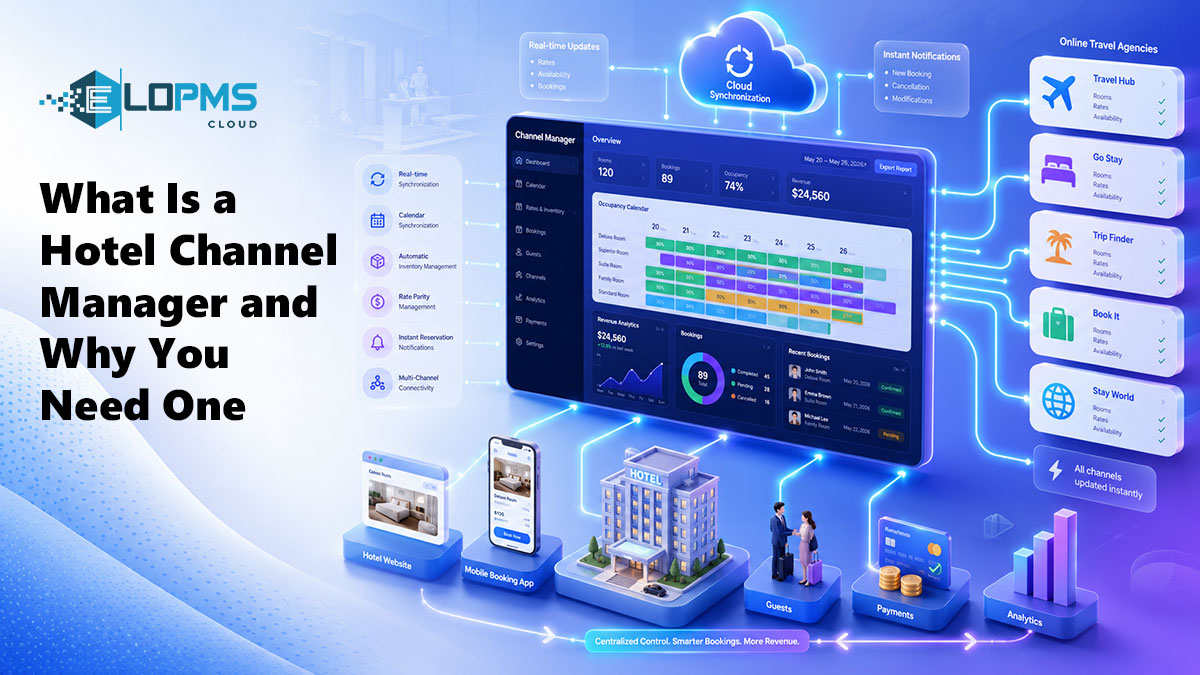
A hotel channel manager is software that connects your property management system (PMS) to online travel agencies (OTAs) like Booking.com, Expedia, and Agoda. It automatically syncs room availability, rates, and restrictions across all channels in real time — so you update once, and every platform reflects the change instantly. Without it, you're logging into each OTA extranet separately every time you adjust rates or close rooms.
If you're managing distribution on multiple OTAs (Booking.com, Expedia, Agoda, Airbnb, or regional platforms), a channel manager isn't optional — it's the infrastructure that prevents overbookings and frees your staff from hours of manual data entry each week.
How a Channel Manager Works (Step by Step)
Here's what happens when you have a channel manager connected to your hotel PMS:
You set rates and availability in your PMS. Change a rate, block a room, or adjust minimum-stay rules — all in one place.
The channel manager pushes updates to all connected OTAs simultaneously. Within seconds, Booking.com, Expedia, Agoda, and any other connected platform reflect the new data.
When a booking arrives on any channel, the channel manager pulls it into your PMS. A guest books on Expedia? The reservation appears in your PMS immediately, with full guest details and payment information.
The PMS automatically adjusts availability across all other channels. If you have 10 Deluxe Rooms and one just sold on Booking.com, your channel manager instantly tells Expedia, Agoda, and all other platforms that you now have 9 available — preventing double bookings.
The flow is: PMS → Channel Manager → OTA1 / OTA2 / OTA3 / Direct Website / Metasearch
This is called two-way sync: data flows both directions. Rates and inventory push out; reservations pull in.
What Happens Without a Channel Manager
Without a channel manager, you're manually updating each OTA's extranet dashboard individually.
A realistic scenario: You run a 30-room guest house listed on Booking.com, Expedia, Agoda, Airbnb, and TripAdvisor. You want to raise weekend rates by 15% and set a 2-night minimum stay.
Here's what that looks like manually:
- Log into Booking.com extranet → navigate to rate plan → update weekend rates → set restrictions → save.
- Log into Expedia Partner Central → repeat the same process.
- Log into Agoda YCS → repeat again.
- Log into Airbnb host dashboard → update calendar.
- Log into TripAdvisor B&B Manager → update availability.
Time per channel: 6–8 minutes if the platform's interface is fast. Total time: 30–40 minutes, every time you adjust rates or availability. Frequency: If you practice revenue management (adjusting rates based on demand), you're doing this 3–5 times per week.
That's 2–3 hours per week of staff time spent on data entry — time that could be spent on guest service, upselling, or strategic work.
The bigger risk: human error. Forget to update one platform, and you're either losing revenue (a channel shows higher rates than the others, so it gets zero bookings) or you overbook (you sold your last Deluxe Room on Booking.com but forgot to close it on Expedia, and now both platforms confirm the same room).
A channel manager eliminates both the time cost and the risk.
PMS vs Booking Engine vs Channel Manager — What's the Difference?
Hotels often confuse these three tools because they work together. Here's the breakdown:
| Tool | What It Does | Who It Connects |
|---|---|---|
| PMS (Property Management System) | Manages your hotel's operations: check-in, folios, room status, housekeeping, accounting | Internal operations — your staff and systems |
| Booking Engine | Lets guests book directly on YOUR website (commission-free) | Guest ↔ Your website |
| Channel Manager | Syncs availability and rates across OTA platforms (Booking.com, Expedia, etc.) | Your PMS ↔ OTA platforms |
Think of it as a three-way relationship:
- The PMS is the source of truth — it holds your real-time inventory and rates.
- The channel manager distributes that data to OTAs so they always show accurate availability.
- The booking engine does the same thing for your direct website, letting guests book without going through a third party.
All three should work together seamlessly. The best setup: all built into one platform, so there's zero integration lag and one vendor managing everything. EloPMS follows this model — the PMS, booking engine, and channel manager are native components of the same system, not third-party add-ons.
Learn more about the full platform in What Is a Hotel PMS.
Key Features to Look For in a Channel Manager
Not all channel managers work the same way. When evaluating options, focus on these capabilities:
Two-Way Sync (Push and Pull)
The channel manager must push data out (rates, availability, restrictions) and pull bookings back into your PMS. One-way sync tools exist (they only send inventory to OTAs but don't pull reservations back) — avoid them. You'll end up manually entering OTA bookings into your PMS, which defeats the purpose.
Real-Time Updates (Not Batch Sync)
Some older systems sync data every 15–30 minutes in scheduled batches. Real-time channel managers update OTAs within seconds. If a walk-in guest books your last room at the front desk, real-time sync closes that room on all OTAs immediately — batch sync leaves a 15-minute window where someone can double-book it online.
Channel Coverage
The channel manager should connect to the OTAs you're using (or planning to use). Major platforms include:
- Global OTAs: Booking.com, Expedia (including Hotels.com, Vrbo), Agoda
- Regional OTAs: Cleartrip (India), Yanolja (Korea), Ctrip (China), Almosafer (GCC)
- Alternative channels: Airbnb, TripAdvisor Instant Booking
- GDS platforms: Amadeus, Sabre, Travelport (for corporate/travel agent bookings)
- Metasearch engines: Google Hotel Ads, Trivago, Kayak
Most channel managers claim to support 200+ channels, but in practice, you'll use 3–8. What matters is that YOUR key channels are on the list.
Rate Plan Support
If you sell different rate types (Best Available Rate, promotional rates, corporate rates, package deals), your channel manager must support multiple rate plans and let you map them to each OTA's structure. Some platforms limit you to one rate plan per room type — that's too restrictive for most hotels.
Restriction Management
You should be able to set channel-level restrictions:
- Minimum/maximum stay: Require a 2-night stay on weekends, for example.
- Closed to arrival / closed to departure: Block Friday check-ins during a sold-out event weekend, but still allow Thursday guests to check out Friday.
- Stop-sell: Completely close a room type on all channels (or specific channels) without deleting rate plans.
These rules are essential for revenue management. If your channel manager can't enforce them, you lose pricing control.
PMS Integration (Native vs API)
This is the biggest decision: built-in (native) vs standalone (API-connected).
- Native/built-in: The channel manager is part of the PMS — same database, same interface, zero integration required. Examples: EloPMS, Cloudbeds, Mews (built-in).
- Standalone: The channel manager is a separate product that connects to your PMS via API. Examples: SiteMinder, Cubilis, RateTiger.
We'll cover this trade-off in the next section.
iCal Support
Some smaller OTAs and platforms like Airbnb don't support full two-way API connections. Instead, they use iCal feeds (a calendar-based sync format). Your channel manager should support iCal as a fallback for these platforms — it's not as real-time as API sync, but it's better than manual updates.
Built-In vs Standalone Channel Manager
The "should I buy a standalone channel manager or get one built into my PMS?" question is the most practical decision you'll make.
Here's the honest breakdown:
| Factor | Built-In (Part of PMS) | Standalone (Separate Product) |
|---|---|---|
| Integration | Native — PMS and channel manager share the same database. Zero sync lag. | API-based connection. Data passes between two separate systems. Potential for sync delays or mapping errors. |
| Cost | Included in your PMS subscription (or small add-on fee). Typical all-in cost: $80–200/month depending on property size. | Separate subscription. Standalone channel managers charge $50–$300/month based on room count and channel connections. You also pay for your PMS separately. |
| Data Flow | Seamless — one system. When a booking arrives, it's instantly in your PMS. No field mapping required. | Requires field mapping during setup. Guest name, room type, rate code, special requests — everything must be mapped between the two systems. If your PMS or the channel manager changes their API, the integration can break. |
| Support | One vendor handles everything. If a booking doesn't sync, you call one support team and they troubleshoot end-to-end. | Two vendors. If a booking doesn't appear, is it the PMS, the channel manager, or the OTA? You're often stuck between two support teams pointing at each other. |
| Setup Time | Immediate (or 1–2 hours for channel credentials). The connection is already built. | Integration project required. Expect 1–2 weeks to map fields, test bookings, and validate rate parity across channels. |
| Best For | Hotels under 100 rooms. Single/small property groups. Operators who want simplicity and predictable cost. | Large hotel groups (100+ rooms) with dedicated IT staff, or properties locked into a legacy PMS that doesn't offer a built-in channel manager. |
For most independent hotels, guest houses, and small groups: built-in wins on simplicity, cost, and support.
When standalone makes sense: You're running a large property (200+ rooms) with a dedicated revenue manager and IT team, and you're already locked into an enterprise PMS (like Opera or Protel) that doesn't include channel management — or the built-in option is weak.
EloPMS includes a built-in channel manager with real-time two-way sync to Booking.com, Expedia, Agoda, and 50+ regional OTAs. It's part of the platform — not a bolt-on integration.
Who Needs a Channel Manager?
Short answer: any hotel listed on 2+ OTAs.
Longer answer:
Independent Hotels and Guest Houses
If you're on Booking.com, Expedia, and your own website, you need a channel manager. Managing three channels manually is borderline manageable — but the moment you add Agoda, Airbnb, or a regional platform, it becomes unsustainable.
Small Properties (Under 30 Rooms)
Small hotels often assume channel managers are only for big properties. Not true. A 12-room guest house on Booking.com + Airbnb + TripAdvisor wastes just as much time on manual updates as a 50-room hotel — and small teams can't afford that time cost.
Multi-Property Groups
If you manage 3+ properties, centralized distribution control is non-negotiable. A channel manager lets you set rates across all properties from one dashboard, maintain brand-level rate parity, and avoid the chaos of juggling multiple logins per property.
Resort and Banquet Properties
If you run a resort with multiple room categories (standard, deluxe, suites, villas) or a hotel with a banquet hall that also rents rooms, your inventory management is more complex. A channel manager prevents the "we thought we had availability but the wedding block took all the Deluxe Rooms" scenario.
The only properties that don't need a channel manager: hotels that sell 100% direct (rare), hotels on only one OTA (extremely rare), or properties still operating offline.
Stop Updating OTAs Manually — Automate Your Distribution
A channel manager saves 2–3 hours per week, eliminates overbooking risk, and lets you manage rates across all OTAs from one dashboard. For hotels on multiple channels, it's non-negotiable infrastructure.
The decision isn't whether to use one — it's whether to buy a standalone tool or get one built into your PMS.
EloPMS includes a real-time channel manager as part of the platform — no separate subscription, no integration project, no field mapping. Your PMS, booking engine, and channel manager work as one system, with one vendor and one support team.
See how it works: schedule a demo or start a free trial.
Want to build a full direct booking strategy? Read How to Stop Paying OTA Commissions (Without Cutting OTAs) for the complete distribution plan. Looking to grow direct bookings alongside OTA sales? See How to Increase Hotel Direct Bookings Without Cutting OTAs.
Sources
- SiteMinder. "What Is a Hotel Channel Manager?" https://www.siteminder.com/r/hotel-channel-manager/
- Hotelogix. "Channel Manager for Hotels: A Complete Guide." https://www.hotelogix.com/blog/channel-manager/
- Booking.com Connectivity. "Two-Way XML Integration Documentation." https://connect.booking.com/
- Expedia Partner Central. "Connectivity Partner Program." https://www.expediagroup.com/