Hotel PMS Implementation: A Step-by-Step Migration Guide
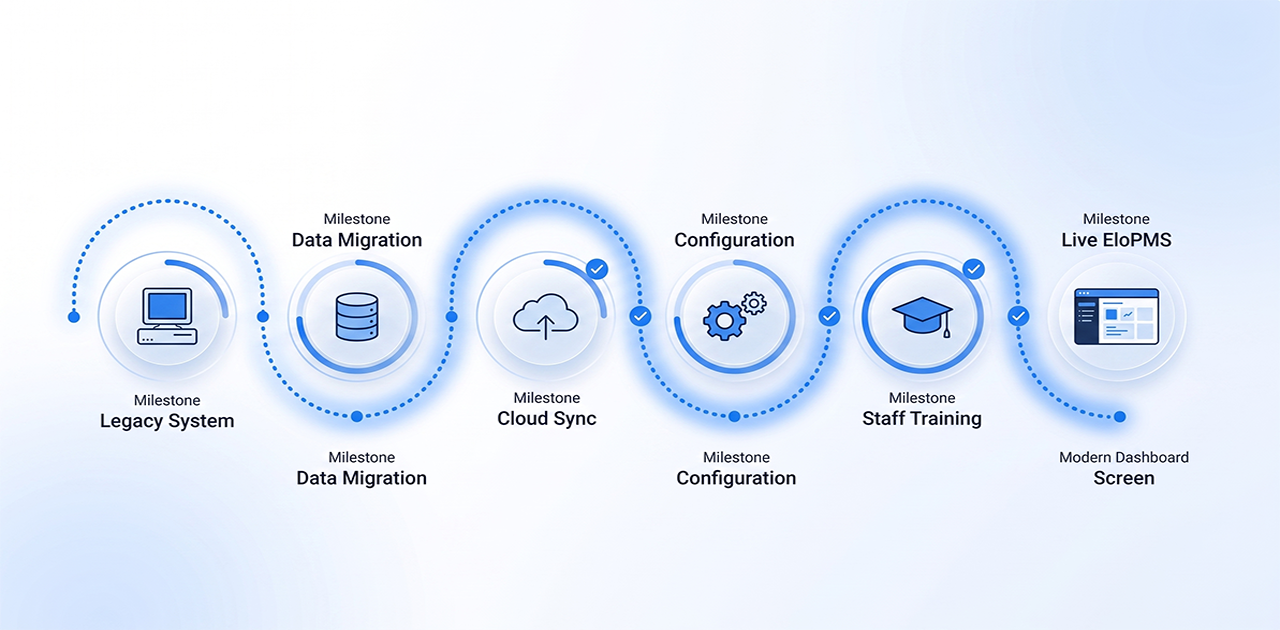
Hotel PMS implementation is the process of switching your property from a legacy system (or spreadsheets) to a modern cloud-based property management system. Most implementations take 1–3 weeks from kickoff to go-live, including data migration, staff training, and testing. The key is preparation: export your current data early, document workflows, and plan for a parallel run before the final switch.
Switching your hotel PMS feels like replacing the engine on a moving car. Your property runs 24/7. You can't afford days of downtime. Staff are already stretched. The fear of losing guest data or creating check-in chaos is real.
Here's the reality: hotel PMS migration is manageable when you know the process. Modern cloud systems are designed for smooth transitions. Most implementations happen with zero guest-facing disruption. The cost of staying on a legacy system—lost revenue from manual errors, compliance risk, inefficiency—is higher than the effort of switching.
This guide walks through the complete migration process, from pre-planning to the first month post-launch.
Why Switching PMS Isn't as Scary as You Think
The three fears we hear most:
1. "We'll lose our guest data." Modern PMS vendors migrate guest profiles, future reservations, and rate plans directly from your old system. You lose historical folios (old bills), but those should be exported as PDFs before migration anyway. Your guest history and future bookings transfer intact.
2. "Staff will panic and make mistakes." You'll run both systems in parallel for 2–3 days before go-live. Staff complete real check-ins on the new system with the old system as backup. By the time you switch, they've done 20+ transactions and know the workflow.
3. "We'll have days of downtime." The actual cutover happens overnight, typically after night audit. Guests check out on the old system; new arrivals check in on the new one. Total disruption: zero.
The cost of NOT switching is compounding. Legacy systems can't connect to modern channel managers, lack mobile access, require manual workarounds for compliance reporting (FBR in Pakistan, ZATCA in Saudi Arabia), and cost you hours per week in duplicate data entry. Every month you delay is lost efficiency.
Before You Start: Pre-Migration Checklist
Start here, 2–3 weeks before your planned go-live date.
Export Your Current Data
Pull these from your existing system and save as CSV or Excel:
- Guest profiles (name, contact, ID, preferences, history)
- Future reservations (arrival/departure dates, room assignments, rates, special requests)
- Rate plans (rack rates, corporate rates, seasonal pricing)
- Room inventory (room types, numbers, amenities)
Pro tip: Export a full guest folio from last month and a reservation report as PDFs. You'll reference these if questions arise post-migration.
Document Current Workflows
Write down, step-by-step, how you currently:
- Check in a walk-in guest
- Post a charge to a room
- Run night audit
- Update room status after housekeeping
- Process group bookings
Your new PMS vendor will replicate these workflows in the new system during setup. Missing steps here = confusion later.
Audit Your Integrations
List every external system your PMS connects to:
- OTA channels (Booking.com, Expedia, Airbnb)
- Payment gateway (card processor)
- Accounting software (QuickBooks, Xero, or local ERPs)
- Door lock system (if you have key card integration)
Most of these will need to be reconnected in the new system. Your vendor handles the technical setup, but you'll need credentials and account details ready.
Assign a Project Lead
Designate one person (usually the front office manager or GM) to own the migration. This person liaises with the vendor, approves the timeline, and troubleshoots issues during go-live. Migration fails when responsibility is diffused.
Step-by-Step Migration Timeline
Here's the realistic timeline for a 40–60 room property switching to a cloud PMS.
Week 1–2: Setup & Data Import
Who's doing what: The PMS vendor configures your property in their system. You provide the exported data (guest list, reservations, rate plans) and answer setup questions.
What happens:
- Vendor creates your property profile (name, address, room types, amenities)
- Imports guest data and future reservations
- Configures rate plans, taxes, and payment gateway
- Sets up user accounts (front desk, housekeeping, management)
Your responsibility: Respond quickly to vendor questions. Review the imported data for accuracy (check 5–10 guest profiles manually).
Typical duration: 5–7 business days
Week 2–3: Staff Training
Training schedule by role:
| Role | Duration | Key tasks covered |
|---|---|---|
| Front desk | 4 hours | Check-in/out, reservations, folios, payments |
| Housekeeping | 1 hour | Room status updates, task management |
| Restaurant/POS staff | 2 hours | Order entry, charge-to-room, KDS |
| Management | 2 hours | Reports, dashboards, rate management |
| Night audit | 2 hours | Audit process, posting, reconciliation |
Training format: Live sessions with sample data (not your real reservations). Staff practice check-ins, room assignments, and payment processing. Record the sessions so late hires can watch them.
Pro tip: Train your fastest learner first, then make them the internal "champion" who helps others during go-live week.
Week 3: Parallel Run (2–3 Days)
This is the safety net. For 2–3 days, you run both the old and new PMS simultaneously.
How it works:
- Every check-in is entered in both systems
- Room status updates go to both
- Staff compare outputs (folios, night audit totals) to verify accuracy
What you're testing:
- Does the new system calculate taxes correctly?
- Do OTA reservations sync into the new PMS automatically?
- Can staff complete a full check-in/check-out cycle without help?
Common issues caught during parallel run:
- Printer setup (receipts printing to wrong device)
- Rate mismatch (rack rate in new system doesn't match old rate card)
- OTA channel delays (Booking.com takes 2 hours to sync, not instant)
All of these are fixable within hours.
Go-Live Day: The Switch
Timeline for go-live:
Day before: Run night audit on the old system as usual. Export final reports.
Go-live night (after audit): Vendor pushes final reservation sync, locks the old system to read-only.
Next morning: All new check-ins happen on the new PMS. Old system stays accessible (read-only) for 30 days in case you need to look up a historical folio.
Staff briefing: 15-minute huddle before first shift. Review the go-live checklist (see below), confirm everyone knows how to reach vendor support.
Week 1 Post-Go-Live: Daily Check-Ins
First 7 days routine:
- Morning huddle (10 min): Any issues from the previous shift?
- Vendor support on standby: Most vendors offer dedicated support during week 1. Use it.
- Edge case log: Write down anything that doesn't work as expected (guest checked out but room still shows occupied, etc.). Vendor fixes these in real-time.
What to expect:
- Small fixes (report formatting, email template tweaks)
- Staff getting faster as muscle memory builds
- Relief that it's working
By day 7, the new system feels normal.
What Data Migrates (and What Doesn't)
Understanding this prevents panic.
What Transfers to the New PMS
✅ Guest profiles (names, contact info, ID scans, preferences, stay history) ✅ Future reservations (all bookings from go-live date forward, including OTA reservations) ✅ Rate plans (rack rates, corporate rates, packages) ✅ Room setup (room types, numbers, amenities, floor plans) ✅ User accounts (staff logins, permissions)
What Usually Doesn't Transfer
❌ Historical folios (bills from past stays—export these as PDFs before migration) ❌ Old financial reports (trial balances, revenue reports from the legacy system) ❌ Custom reports (you'll rebuild these in the new system's report builder)
What Needs to Be Re-Configured
🔄 OTA channel connections (you'll reconnect Booking.com, Expedia, etc., via the new channel manager) 🔄 Payment gateway (vendor re-links your card processor) 🔄 Email templates (welcome emails, confirmation emails, invoices) 🔄 Receipt/invoice print layouts
Bottom line: Your operational data (guests, reservations, rates) migrates. Your reporting and integrations get rebuilt, but vendors provide templates so you're not starting from scratch.
Staff Training Plan
The system is only as good as the people using it.
Front Desk Training (4 hours)
Module 1: Check-In Flow (90 min)
- Search for reservation vs walk-in guest
- Assign room, verify rate, scan ID
- Process payment (deposit or full prepayment)
- Print key card and receipt
Module 2: Managing Reservations (60 min)
- Create new reservation
- Modify reservation (extend stay, change room type)
- Handle cancellations and no-shows
Module 3: Folios & Check-Out (60 min)
- Post manual charges (minibar, laundry)
- Split bills
- Process check-out and payment
- Handle early departure adjustments
Module 4: Common Scenarios (30 min)
- Guest locked out (reissue key)
- Billing dispute (view transaction history)
- Group check-in (master folio)
Housekeeping Training (1 hour)
- Mark rooms clean/dirty/inspected via tablet or desktop
- Flag maintenance issues
- View daily task list
Keep it simple: Housekeeping staff don't need to know check-in procedures. They need 5 buttons: Clean, Dirty, Inspected, Out of Order, Flag Issue.
Restaurant/POS Training (2 hours)
If your PMS includes integrated POS (like EloPMS restaurant POS):
- Enter orders (dine-in, room service, takeaway)
- Charge to room (link order to guest folio)
- Kitchen display system (KDS) workflow
- End-of-shift cashier settlement
Management Training (2 hours)
- Pull daily reports (revenue, occupancy, ADR)
- Adjust rate plans and availability
- Review dashboards (upcoming arrivals, housekeeping status)
- User management (add/remove staff, reset passwords)
Night Audit Training (2 hours)
- Run end-of-day audit process
- Post automated charges (room revenue, taxes)
- Reconcile payments
- Generate financial reports
Pro tip: Have your night auditor shadow the vendor's training specialist for the first 2–3 audits. Audit errors compound, so this role needs the most hand-holding.
Go-Live Day Checklist
Print this. Check every item before you flip the switch.
- All future reservations imported and verified (spot-check 10 bookings)
- Rate plans configured and tested (check rack rate, corporate rate, walk-in rate)
- Room types and inventory match physical property
- OTA channels connected and syncing (confirm with test reservation)
- Payment gateway tested (process a $1 test transaction)
- All staff logins created and tested (each staff member can log in)
- Night audit process tested (run mock audit on sample data)
- Backup of old system data exported (guest list, reservations, folios saved locally)
- Printers configured (receipts, invoices, reports printing correctly)
- Vendor support contact info posted at front desk
If even ONE item is unchecked, delay go-live. A smooth migration beats a fast one.
What If Something Goes Wrong?
Have a contingency plan.
Keep the Old System Accessible (Read-Only)
For 30 days post-migration, your old PMS should stay live in read-only mode. If a guest disputes a charge from last month, you can pull the historical folio from the legacy system.
Vendor Support During Go-Live Week
Ask your vendor for dedicated support during the first 7 days. This usually means:
- Phone/chat support with <15 min response time
- Screen-sharing sessions to troubleshoot live issues
- A named contact (not a general support queue)
Budget for this: Some vendors charge extra for priority go-live support. It's worth it.
Common Issues (and Fixes)
| Issue | Cause | Fix time |
|---|---|---|
| OTA reservations not syncing | Channel manager credentials need re-auth | 30 min |
| Rate showing wrong amount | Tax settings misconfigured | 15 min |
| Receipt not printing | Printer IP changed, needs reconfiguration | 10 min |
| Night audit won't close | One folio still has open transactions | 20 min |
None of these are catastrophic. They're all fixable within an hour with vendor support.
Rollback Plan (Worst-Case)
If, within the first 24 hours, the new system is fundamentally broken (can't check in guests, payments failing, data corruption), you can roll back to the old system. This is extremely rare with modern cloud PMS vendors, but the option exists.
Rollback requirements:
- Old system still installed and accessible
- No new reservations entered exclusively in the new system (parallel run prevents this)
- Vendor support agrees the issue is critical
In 15 years of hotel operations, I've never seen a rollback happen. But knowing it's possible reduces pre-launch anxiety.
Ready to Migrate? Here's What to Do Next
Hotel PMS implementation isn't a technical project—it's a change management project. The technology works. The challenge is preparing your team, planning the timeline, and managing the transition without disrupting operations.
If you've decided to switch:
- Choose your go-live date (low-season week, preferably mid-month)
- Export your current data (guest list, reservations, rate plans)
- Schedule vendor kickoff (most PMS providers offer free migration planning)
EloPMS implementations typically take 3–5 days from data import to go-live, including training for front desk, housekeeping, and restaurant staff. We've migrated properties from eZee, OPERA, legacy spreadsheets, and manual logbooks. Our implementation includes data migration, staff training, and 30-day post-launch support.
Schedule a demo to discuss your migration timeline, or start a free trial to test the system with your own data before committing.
Related guides:
- What Is a Hotel PMS? — Full overview of PMS features and benefits
- How to Choose a Hotel PMS — Vendor evaluation framework
- Cloud PMS vs On-Premise: Which Is Right for Your Hotel? — Deployment model comparison
For multi-property implementations, read our multi-property management guide to understand group-level migration strategies (staggered vs simultaneous rollout).
Sources
- Mews: PMS implementation best practices — Timeline and training guidance
- Cloudbeds: How to switch PMS without disrupting operations — Data migration specifics
- Hotel Tech Report: Average PMS implementation timeline — Industry benchmarks