What Is a Hotel PMS? The Complete Guide for 2026
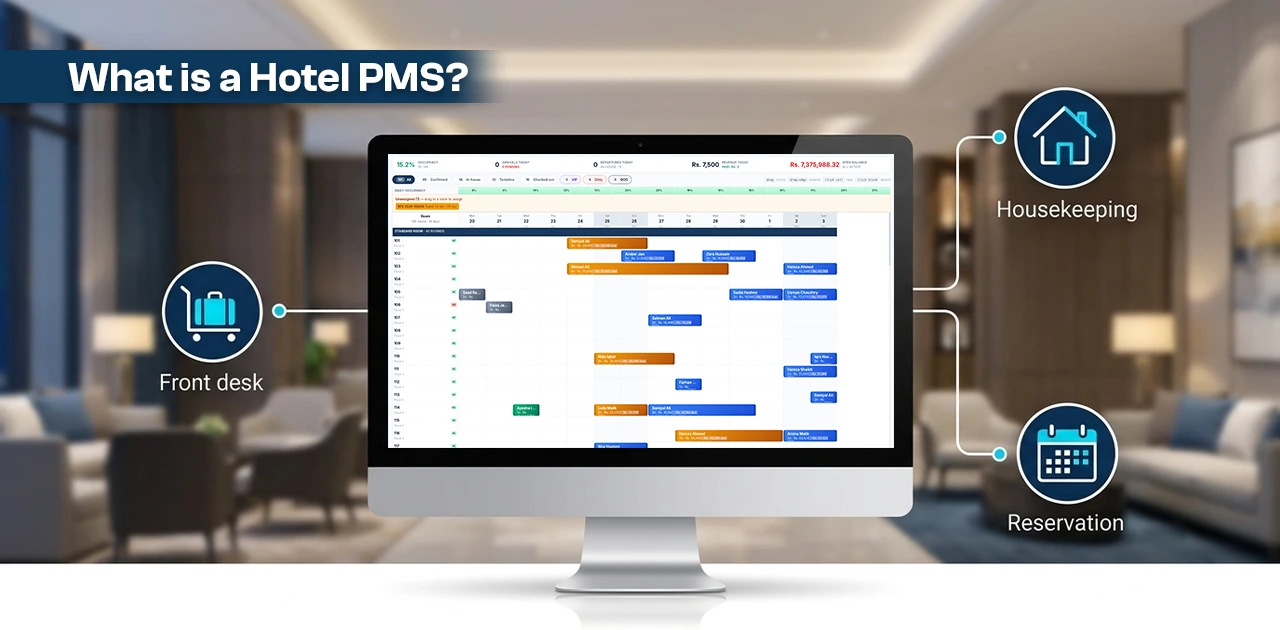
TL;DR: A hotel PMS (Property Management System) is the central software that runs a hotel's daily operations — reservations, check-in/out, housekeeping, billing, and reporting — from a single platform. Modern cloud-based systems replace paper records and disconnected tools with real-time data shared across every department.
Last updated: July 2026
A hotel property management system (PMS) is the central software platform that runs a hotel's daily operations — from reservations and check-in to housekeeping, billing, and reporting. Modern cloud-based PMS platforms replace paper folios, spreadsheets, and disconnected tools with a single system that every department shares in real time.
If you run a hotel, guest house, or resort, your PMS is the operating system of your property. Every guest interaction, every charge, every room status update flows through it. Get it right, and your front desk runs smoothly, your revenue reports are accurate, and your staff spend less time on admin. Get it wrong, and you're stuck reconciling spreadsheets at midnight.
This guide breaks down what a hotel PMS does, who uses it, how the technology has evolved, and what to look for when choosing one — whether you're buying your first system or replacing one that no longer fits.
What Does PMS Stand for in Hotels?
PMS stands for Property Management System — the operational software that manages every department in a hotel under one roof.
The name comes from the fact that it manages the entire property — not just reservations, not just billing, but every operational function under one roof.
Hotels adopted the term to distinguish their operational software from other business systems like CRMs (customer relationship management) or ERPs (enterprise resource planning). While a CRM tracks marketing leads and an ERP handles enterprise-wide accounting, a hotel PMS is purpose-built for hospitality. It understands room types, rate plans, folios, night audits, and guest preferences in a way that generic software never will.
A brief history: from rack cards to the cloud
Hotel technology has evolved through three distinct eras:
- Pre-digital (before 1970): Hotels managed reservations with physical rack cards, room keys hung on pegboards, and guest folios written by hand. Westin introduced one of the first hotel reservation systems in 1947, but most properties relied on paper until the 1970s. [source: Mews, "Hotel Property Management System Technology," mews.com]
- On-premise PMS era (1970–2010): The first PMS technology appeared around 1970, automating reservations and front-desk operations on local servers. Systems like Fidelio (later acquired by Oracle as OPERA) became the industry standard for large chains. By the mid-1990s, PMS platforms integrated front office, housekeeping, and basic accounting. In 1995, the internet opened the door to online booking — and suddenly, hotels needed their PMS to connect with distribution channels. [source: Mews, mews.com]
- Cloud PMS era (2010–present): The first cloud-based PMS launched around 2010, eliminating the need for on-site servers and IT staff. Cloud systems update automatically, work from any device, and connect to third-party tools through APIs. Today, the hotel PMS market is valued at USD 3–7 billion globally (estimates vary by research firm) and is growing at double-digit annual rates as cloud adoption accelerates. [source: Business Research Insights, 2025; GM Insights, 2024]
The shift from on-premise to cloud isn't just a hosting change. It fundamentally changes how hotels operate — staff can check a guest in from a tablet at the lobby door, managers can review occupancy from their phone, and multi-property groups can see all their hotels from a single dashboard.
Hotel PMS Features Checklist
A comprehensive hotel PMS should include these core capabilities:
- ✓ Front desk and reservations — tape chart (visual room grid), individual/group bookings, check-in/out, room assignments
- ✓ Guest profiles and CRM — unified guest records, stay history, preferences, direct marketing tools
- ✓ Housekeeping and maintenance — real-time room status board, task assignment, mobile access
- ✓ Commission-free booking engine — website direct bookings with real-time PMS integration
- ✓ Channel manager — OTA distribution (Booking.com, Expedia, Agoda) with two-way sync
- ✓ Restaurant POS and outlets — charge-to-room capability, multi-outlet support (bar, spa, room service)
- ✓ Accounting and finance — general ledger, AR/AP, bank reconciliation, tax compliance
- ✓ Reporting and analytics — occupancy, ADR, RevPAR, segment analysis, financial summaries
- ✓ Multi-property management — centralized dashboard for hotel groups
- ✓ Mobile access — operate from any device, anywhere
- ✓ Cloud-native architecture — automatic updates, zero IT infrastructure
What Does a Hotel PMS Actually Do?
A modern hotel PMS handles eight core operational areas. Here's what each module does in practice — not as a feature list, but as the daily work it replaces.
Front Desk and Reservations
The front desk module is the nerve center. It manages your tape chart (visual room grid), individual and group reservations, walk-in check-ins, room assignments, and check-outs.
In a 48-room boutique hotel processing 200 check-ins per month, this means the difference between a 90-second check-in (PMS pulls the reservation, assigns the room, posts the deposit) and a 5-minute manual process with paper forms. Multiply that across peak check-in hours, and you're looking at real labor savings.
Guest Profiles and CRM
A good PMS stores a single, unified guest record — what the industry calls the "one guest, one record" principle. Every stay, every preference (pillow type, floor preference, dietary needs), every folio balance lives in one profile. When Mr. Malik returns for his fourth stay, your front desk agent sees his history without asking.
This data also drives your direct booking strategy. Know your guests well enough, and you don't need OTAs to fill rooms. Learn more about guest management →
Housekeeping and Maintenance
When a guest checks out, the housekeeping module immediately flips the room status from "occupied" to "dirty." The housekeeping supervisor sees it on a color-coded board — no phone call, no paper list, no walkie-talkie. As rooms are cleaned and inspected, statuses update in real time, and the front desk knows instantly which rooms are ready to sell.
For a resort with 100+ rooms, this eliminates the most common source of front-desk delays: calling housekeeping to ask if Room 312 is ready.
Booking Engine
A booking engine sits on your hotel's website and lets guests reserve rooms directly — no OTA, no commission.
This is a significant revenue lever. OTA commission rates typically range from 15–30% per booking. Booking.com charges a 15% base commission, which can climb to 18–23% with their Preferred Partner and visibility programs [source: Rield Revenue Management, rield-rm.com]. Expedia takes 10–30% depending on your market and agreement [source: StayFi, stayfi.com]. Airbnb typically charges hosts 14–16% per booking [source: Lodgify, lodgify.com].
A commission-free booking engine on your own website means every direct booking keeps that 15–30% in your pocket. For a 50-room hotel at 65% average occupancy with an ADR (Average Daily Rate) of $80, that could mean thousands of dollars saved monthly.
Channel Manager
While a booking engine captures direct bookings, a channel manager distributes your rooms across OTAs like Booking.com, Expedia, and Agoda — and keeps availability, rates, and restrictions synchronized in real time.
Without a channel manager, updating rates across five OTAs means logging into five extranet dashboards, making the same change five times, and hoping you don't oversell. A channel manager makes one update and pushes it everywhere. It also closes availability the instant a room is booked on any channel, preventing the double-booking nightmare.
Restaurant POS and Outlets
Hotels with restaurants, bars, room service, or banquet facilities need a point-of-sale system that talks to the PMS. When a guest orders dinner and says "charge it to my room," the POS module posts that charge directly to the guest's folio. No paper chit. No manual entry at the front desk. No reconciliation headache at night audit.
This extends beyond restaurants. An all-in-one platform handles charges from the spa, minibar, laundry, business center — any revenue outlet in the property — the same way.
Accounting and Financial Reporting
Most basic PMS platforms stop at revenue tracking and force hotels to export data into separate accounting software (QuickBooks, Tally, or spreadsheets). An all-in-one PMS with built-in accounting keeps the general ledger, accounts receivable, accounts payable, and bank reconciliation inside the same system.
The practical benefit: your night audit closes the day, posts revenue accruals, updates the trial balance, and generates the daily revenue report — all without leaving the PMS. No CSV exports, no paste-into-spreadsheet, no data mismatch between your front office and your accountant.
Reporting and Analytics
Revenue management runs on three core metrics that every hotelier should track:
- Occupancy Rate = (Rooms Sold ÷ Rooms Available) × 100 — the percentage of your rooms filled on a given night. [source: AltexSoft, altexsoft.com]
- ADR (Average Daily Rate) = Total Room Revenue ÷ Rooms Sold — how much revenue each sold room generates. [source: AltexSoft, altexsoft.com]
- RevPAR (Revenue Per Available Room) = Total Room Revenue ÷ Total Available Rooms (or ADR × Occupancy Rate) — the truest measure of room revenue performance because it accounts for unsold inventory. [source: AltexSoft, altexsoft.com]
A PMS reporting module calculates these automatically, along with dozens of other reports: segment performance, source-of-business, rate-code analysis, housekeeping productivity, and financial summaries.
Mid-article CTA: EloPMS combines all eight modules — front desk, booking engine, channel manager, POS, housekeeping, accounting, and 60+ reports — in one unified platform. See the full feature list →
EloPMS is a cloud-based hotel property management system built by IT Vision Pvt. Ltd. in Lahore, Pakistan, that unifies front desk, POS, booking engine, channel manager, and accounting in a single database — designed for independent hotels, boutique properties, and small groups in Pakistan and the GCC.
Who Uses a Hotel PMS? (And Why They Care About Different Things)
A PMS serves every role in a hotel, but each user cares about different capabilities:
| Role | What they need from the PMS | What keeps them up at night |
|---|---|---|
| General Manager | Single dashboard for occupancy, revenue, and guest satisfaction across all departments | "Are we on track this month? How does Property A compare to Property B?" |
| Front Desk Agent | Speed — fewer clicks per check-in, fast room assignment, instant folio access | "The guest is waiting. I need to find their reservation in 3 seconds, not 30." |
| Revenue Manager | Rate controls, channel performance data, occupancy forecasting, competitor rate shopping | "Should I raise BAR by $10 for next weekend? Which channel is delivering the most revenue per booking?" |
| Owner / Investor | ROI: revenue growth, cost reduction (especially OTA commissions), tax compliance | "How much are we paying OTAs? Are we FBR-compliant? Can I see P&L without calling the accountant?" |
| Housekeeping Supervisor | Real-time room status board, task assignment, mobile access | "Which rooms are due for deep clean? Did the new housekeeper finish the 3rd floor?" |
The best PMS platforms make each of these roles faster and better-informed — not just the front desk.
Cloud PMS vs On-Premise: Which Model Fits Your Hotel?
This is the most important infrastructure decision you'll make when choosing a PMS. Here's a side-by-side comparison:
| Factor | On-Premise PMS | Cloud PMS |
|---|---|---|
| Deployment | Installed on local server at hotel | Hosted on provider's cloud servers |
| Upfront cost | High (server hardware + licenses) | Low (monthly subscription) |
| Updates | Manual, scheduled downtime required | Automatic, zero downtime |
| Access | On-property network only | Any device, any location |
| IT staff needed | Yes (for server maintenance) | No (provider handles infrastructure) |
| Scalability | Requires new hardware for growth | Add properties/rooms instantly |
| Data backup | Hotel's responsibility | Provider's responsibility (redundant backups) |
| Internet dependency | Works offline | Requires internet (offline mode varies by vendor) |
The bottom line: On-premise systems made sense when cloud technology was immature and internet connectivity was unreliable. In 2026, the vast majority of new PMS deployments are cloud-based. The cost savings, automatic updates, and anywhere-access make it the practical choice for most hotels.
A note for hotels in Pakistan and the GCC: If your property is in an area where internet connectivity is inconsistent, look for a cloud PMS with offline capability — the ability to continue check-ins and charge posting even when the internet drops, with automatic sync when connectivity returns. This is a real operational concern in some regions, and not every cloud PMS handles it.
For a deeper comparison, see our dedicated guide: Cloud PMS vs On-Premise: Which Is Right for Your Hotel?
Basic PMS vs All-in-One Platform
Not all hotel PMS platforms are built the same. The industry broadly breaks into two categories:
| Capability | Basic PMS | All-in-One PMS |
|---|---|---|
| Front desk and reservations | ✓ | ✓ |
| Booking engine | ✗ (separate vendor, extra cost) | ✓ Built-in |
| Channel manager | ✗ (separate vendor, extra cost) | ✓ Built-in |
| Restaurant POS | ✗ | ✓ Built-in |
| Accounting (double-entry ledger) | ✗ (export to QuickBooks/Tally) | ✓ Built-in |
| Tax compliance (FBR/ZATCA) | ✗ | ✓ Built-in |
| Multi-property management | Rarely | ✓ |
| Inventory and purchasing | ✗ | ✓ Built-in |
Why this matters: When you use separate vendors for your PMS, booking engine, channel manager, POS, and accounting, you create data silos. The guest folio in your PMS doesn't match the charge in your POS. Your accounting software doesn't see revenue until someone exports a CSV. Your booking engine doesn't know which rooms housekeeping has finished cleaning.
An all-in-one platform operates on the principle of one guest, one ledger — every charge, every payment, every room status change happens in the same system. The result: no reconciliation, no data mismatch, no waiting for exports.
The tradeoff? Best-of-breed vendors sometimes offer deeper functionality in a single module. But for most independent hotels, boutique properties, and small groups (10–100 rooms), the operational simplicity of an all-in-one system outweighs the marginal feature depth of separate tools.
Hotel PMS and Tax Compliance
This is an area most PMS guides skip entirely — and it's one where the wrong choice can create serious operational and legal problems.
Pakistan: FBR e-invoicing
Pakistan's Federal Board of Revenue (FBR) requires hotels to generate compliant electronic invoices for all transactions. This includes room charges, restaurant bills, banquet services, and other hospitality revenue. Hotels need a PMS that can generate FBR-compliant invoices with the correct tax codes, QR codes, and real-time reporting to the FBR portal.
A PMS without built-in FBR compliance means your finance team is either manually generating compliant invoices outside the system or risking non-compliance — neither is acceptable for a property processing hundreds of transactions daily.
Saudi Arabia: ZATCA Phase-2 e-invoicing
Saudi Arabia's ZATCA (Zakat, Tax and Customs Authority) has rolled out mandatory e-invoicing in 24 waves since 2023. As of mid-2026, all VAT-registered taxpayers — including hotels — must integrate their invoicing systems with ZATCA's Fatoora platform. Wave 24, the final wave, covers all remaining VAT-registered businesses with a June 1, 2026 deadline. [source: ZATCA, zatca.gov.sa; FatooraPlus, fatooraplus.com]
For hotels operating in Saudi Arabia, this means your PMS must generate cryptographically signed e-invoices that integrate directly with ZATCA's system. A PMS without ZATCA compliance requires a separate e-invoicing solution bolted on — adding cost, complexity, and integration risk.
The takeaway: If you operate in Pakistan or the GCC, tax compliance should be a core evaluation criterion — not an afterthought. It should be built into the PMS, not bolted on.
PMS vs Channel Manager: What's the Difference?
A PMS (Property Management System) manages your internal hotel operations — reservations, guest profiles, housekeeping, billing, and reporting. It's your operational backbone.
A channel manager manages your external distribution — it pushes room availability and rates to OTA platforms (Booking.com, Expedia, Agoda) and pulls reservations back into your PMS in real time.
| Aspect | PMS | Channel Manager |
|---|---|---|
| Scope | Internal operations | External distribution |
| Key functions | Front desk, billing, housekeeping, reporting | OTA connectivity, rate/availability sync |
| Data flow | Operates within your property | Connects your PMS to OTAs |
| User | Front desk, housekeeping, management | Revenue manager, front desk |
| Standalone use | Can operate alone (no OTA sales) | Requires a PMS to pull data from |
The bottom line: A PMS is your operating system. A channel manager is your distribution tool. Some all-in-one PMS platforms include a built-in channel manager (one system, no integration needed). Basic PMS platforms require you to subscribe to a separate channel manager, creating integration and data-sync complexity.
How to Choose the Right Hotel PMS
Choosing a PMS is a multi-year commitment. Here are seven buying criteria to evaluate every vendor against:
- Cloud-native architecture — Is it truly cloud-built, or a legacy system with a cloud wrapper? True cloud PMS platforms update automatically and work from any device.
- All-in-one vs integrations — Does it include a booking engine, channel manager, POS, and accounting, or will you need to buy and integrate those separately?
- Multi-property support — If you have (or plan to have) more than one property, can you manage them from a single dashboard with consolidated reporting?
- Outlet support — Does it handle restaurant POS, banquet billing, spa, and other outlet charges with folio posting?
- Tax and regulatory compliance — Does it support FBR, ZATCA, or the compliance regime in your market — built in, not as an add-on?
- Support and onboarding — What does training look like? Is support available in your time zone? What's the typical go-live timeline?
- Pricing model — Per room/month? Flat fee? Setup charges? Hidden costs for integrations or additional modules?
For a deeper evaluation framework, see our complete buyer's guide: How to Choose a Hotel PMS: 10 Questions to Ask Before You Buy
Your Hotel Deserves a System That Works as Hard as Your Team
A hotel PMS is more than software — it's the operational backbone of your property. The right PMS eliminates data silos between departments, gives every team member the information they need in real time, and replaces manual reconciliation with automated accuracy.
Whether you run a 15-room guest house in Murree or a 200-room city hotel in Riyadh, the principles are the same: centralize operations, cut unnecessary commission costs, maintain tax compliance, and give your staff tools that make their jobs easier — not harder.
Ready to see what an all-in-one cloud PMS looks like in action?
Start a 14-day free trial — no credit card required.
Or book a personalized demo to see EloPMS configured for your property type.
Sources
- Mews, "Hotel Property Management System Technology," mews.com/en/blog/hotel-property-management-system-technology
- AltexSoft, "RevPAR, Occupancy Rate, ADR, and Other Hotel Metrics," altexsoft.com/blog/revpar-occupancy-rate-adr-hotel-metrics/
- Rield Revenue Management, "Booking.com Commission Guide 2026," rield-rm.com/en/booking-com-commission-guide/
- Lodgify, "Airbnb Host Fees: What Percentage Does Airbnb Take in 2026?," lodgify.com/blog/airbnb-host-fees/
- StayFi, "OTA Fees," stayfi.com/vrm-insider/2025/11/04/ota-fees/
- Cloudbeds, "Online Travel Agencies Commissions," cloudbeds.com/online-travel-agencies/commissions/
- ZATCA, "Roll-out Phases," zatca.gov.sa/en/E-Invoicing/Introduction/Pages/Roll-out-phases.aspx
- FatooraPlus, "All ZATCA Waves Timeline 2023–2026: Complete Guide," fatooraplus.com/blog/all-zatca-waves-timeline-2023-2026-complete-guide/
- Business Research Insights, "Hotel PMS Market Size | Forecast 2025–2035," businessresearchinsights.com/market-reports/hotel-pms-market-118647
- Apaleo, "History of the Hotel PMS," apaleo.com/blog/industry-trends/history-of-the-hotel-pms